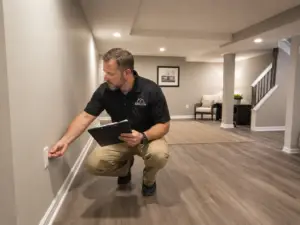
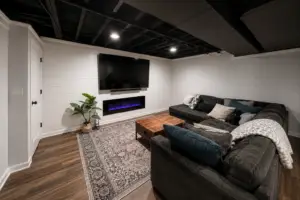
Working from home has changed what people need from their living space. A kitchen table works for a few hours. A corner of the bedroom works until it doesn’t. But a dedicated basement home office — a real room designed around the way you actually work — is a different category entirely.
Done right, a basement office gives you something most above-grade home offices can’t: genuine separation. You go downstairs, you’re at work. You come up, you’re home. That mental boundary matters more than most people expect.
Here’s how to design a basement office that delivers on both focus and function.
Start With the Basics: Light, Air, and Height
Basements have a reputation problem when it comes to offices. The concern is usually the same — dark, damp, low-ceilinged spaces that feel more like storage than a place to spend eight hours a day. That reputation is earned in unfinished basements. A properly finished basement office is a different story, but it does require deliberate planning.
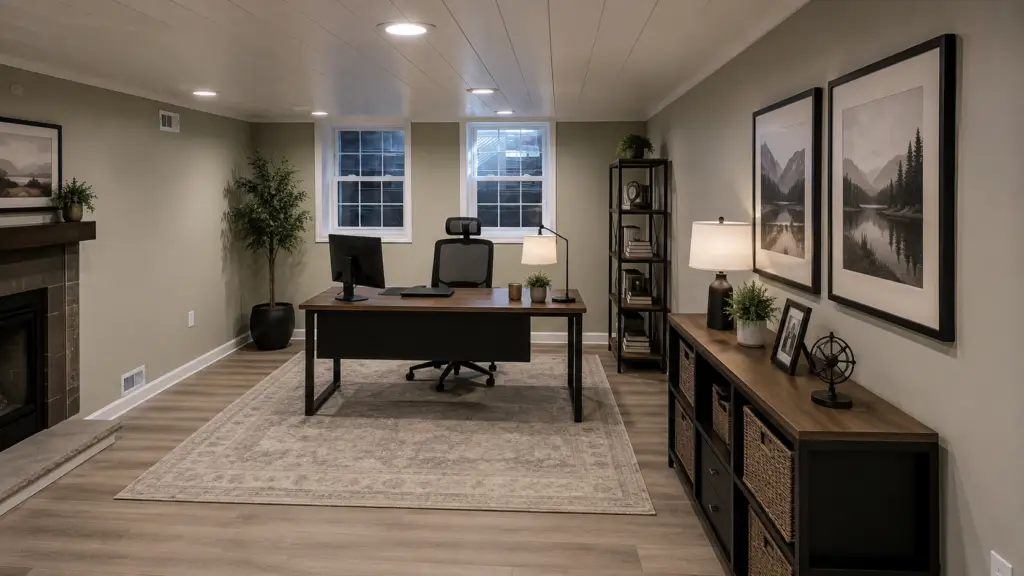
Lighting is the most important design decision you’ll make. A basement with no natural light needs a layered artificial lighting plan that compensates. That means:
- Ambient lighting — recessed LEDs on a dimmer, spread evenly across the ceiling. Warm-to-neutral white (3000K–4000K) works best for daytime work without the harshness of cool white.
- Task lighting — a desk lamp or under-cabinet lighting directly at your work surface. Overhead ambient light alone creates glare on screens and eye strain over long sessions.
- Accent lighting — wall sconces, shelving lights, or LED strips behind a monitor can help the room feel less flat and reduce the contrast between a bright screen and a dark background.
If your basement has any window wells or egress windows, position your desk to take advantage of that natural light — even a small amount of daylight does a lot for mood and alertness over an eight-hour stretch.
Ceiling height affects the feel of the space. A finished ceiling at 7’6″ or above feels comfortable. Below that, even well-lit spaces can start to feel compressed. If your basement has limited ceiling height, we’ll work with you on the right ceiling treatment — sometimes a drywall ceiling isn’t the answer, and a well-executed open or coffered design can actually make a low space feel more intentional.
Air quality and ventilation matter more in an office than most rooms. You’re spending sustained time in this space. Make sure the HVAC plan includes a dedicated supply and return in the office, and that the room gets proper air exchange. Stale air in a sealed basement room kills focus just as effectively as noise or bad lighting.
Layout: Designing Around How You Work
Before you finalize the floor plan, think through a typical work day. What does your desk setup actually look like? How many monitors? Do you take video calls? Do you need space to spread out physical materials — drawings, documents, samples? Do you meet with clients in this space?
The answers to those questions drive the layout.
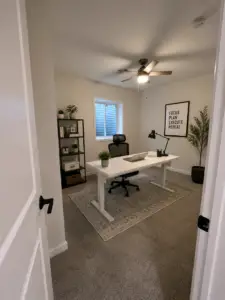
Dedicated zones make a big difference in a home office. Even in a modest-sized space, separating your primary work area from storage and any meeting or collaboration space keeps things from feeling cluttered. A natural break — a bookcase, a partial wall, a change in flooring material — can do the work without requiring a formal divider.
Built-ins are worth the investment in a basement office. Floor-to-ceiling shelving, a built-in desk with integrated cable management, or a custom credenza behind the primary work surface all make the space feel intentional and dramatically reduce visual clutter. We can frame and finish built-in cabinetry as part of the basement project, or work with a cabinet maker to integrate custom millwork into the finish package.
Video call background matters. If you’re on camera regularly, the wall behind your desk is essentially your professional backdrop. Think about what it looks like — a clean, well-lit wall, a tasteful built-in bookcase, or a simple piece of artwork goes a long way. An unfinished wall, a closet door, or a pile of storage boxes is a daily reminder that the space wasn’t designed.
Sound: The Underrated Variable
A home office lives or dies on quiet. Noise from above — foot traffic, the kitchen, kids — bleeds into calls and makes it hard to concentrate. Sound from the office bleeds upward, which matters if someone’s sleeping or working above you.
This is an area where basement offices have a natural advantage: the concrete structure is already a better sound barrier than a wood-frame wall. But a finished basement with standard construction still transmits more noise than most people expect.
Things that make a meaningful difference:
- Insulation in the ceiling assembly — rockwool or dense-pack insulation between the basement ceiling and the floor above reduces airborne sound transfer significantly.
- Resilient channels or acoustic clips — decoupling the drywall ceiling from the joists above reduces impact sound (footsteps, dropped objects) from traveling down into the office.
- Solid-core door — a hollow-core door is acoustically close to an open doorway. A solid-core door at the office entrance makes a real, audible difference.
- Weather stripping on the door — the gap under and around a door is where sound travels. A door sweep and proper weather stripping close that gap.
You don’t need a recording studio. But if you’re taking client calls from this space, or if there are kids at home during the day, the difference between standard construction and a few thoughtful acoustic upgrades is the difference between a distraction-free office and a space you avoid using.
Flooring: Comfort Over Eight Hours
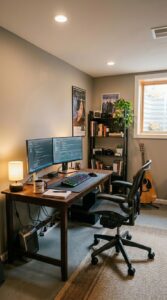
You’ll spend more time in your home office than in almost any other room in the house. The floor matters.
Carpet is the most comfortable option for a pure office use — it absorbs sound, it’s easy on feet and joints during long days, and it’s warm in the winter. If you spend most of your day seated, a good carpet pad makes a noticeable difference over time. The downside: rolling an office chair on carpet is friction-heavy and wears the fibers at the chair path. A chair mat solves this.
LVP (luxury vinyl plank) has become the most popular basement flooring choice, and for good reason — it’s waterproof, durable, and looks great. For an office specifically, add an anti-fatigue mat at your standing desk and a thick area rug under the desk to add warmth and reduce echo.
Avoid hard tile in a home office unless you’re pairing it with significant rugs and acoustic treatment. A hard tile floor in a bare room creates noticeable echo that makes calls sound tinny and focused work more fatiguing.
Temperature and Humidity Control
Basements run cool — often a benefit in the summer, but something to plan for in the winter. A properly insulated and heated basement office will stay comfortable year-round, but “properly” is doing real work in that sentence.
Insulate the exterior walls. Below-grade concrete walls without insulation are cold, and cold walls drive uncomfortable radiant heat loss even when the air temperature in the room is fine. We always insulate properly before closing up walls — this is one of the material standards that separates a well-built basement from one that feels cold and clammy six months a year.
Humidity is worth monitoring. Basements can run humid, and a humid office is uncomfortable and damaging to equipment. A properly sealed and conditioned basement stays within a comfortable humidity range without intervention — but if you’re finishing an older or previously damp basement, a whole-home dehumidifier or a ductless mini-split with dehumidification capability is worth discussing as part of the mechanical plan.
Technology Infrastructure
A home office has higher technology demands than most rooms. Plan for them before walls close.
Ethernet over Wi-Fi, always. A hardwired connection to your router is faster, more reliable, and more secure than wireless — especially during video calls. Run Cat6 cable in-wall from your router location to the desk. This is a small cost during construction and eliminates one of the most common home office frustrations.
Power where you need it. Think through every device at your desk — computer, monitors, docking station, task light, phone charger, speakers — and count the outlets. Then add more. A well-planned home office has power at the desk, behind any built-in cabinets, and on any wall where a display might mount. USB-A and USB-C outlets at the desk are worth the minimal upgrade cost.
Cable management from the start. In-wall cable management for monitor cables, ethernet, and power keeps the desk looking clean and eliminates the tangle that makes a home office feel temporary. This is infinitely easier to do during construction than after.
Dedicated circuit for office equipment — especially if you’re running multiple monitors, a desktop workstation, or other high-draw devices. This protects your equipment from the voltage fluctuations that happen when household appliances share circuits, and it’s a small cost during the electrical rough-in.
Making It Feel Like a Place You Want to Be
Function is the foundation, but a home office that feels like a chore to sit in will never reach its potential. The finishing touches matter.
Paint color has a real effect on mood and productivity. Cooler neutrals — soft grays, muted blues, sage greens — tend to support sustained focus better than warm, stimulating colors. That said, a color you genuinely like matters more than color theory. A room that feels like you is a room you’ll use.
A good chair is an infrastructure purchase, not a luxury. If you’re working eight hours a day, your chair matters more than almost any finish decision in the room. Budget accordingly — this is worth prioritizing over premium flooring or lighting upgrades.
Plants, art, and personal objects make a significant difference in how a space feels to inhabit. A basement office that looks like a set is harder to spend time in than one that reflects the person working in it.
What Beautiful Basements Handles
We build the room — framing, insulation, drywall, ceilings, flooring, lighting, built-in framing, and all finish work. Our licensed electrical partners handle every outlet, circuit, and in-wall cable pathway. We coordinate with your AV or IT provider if you’re doing a more complex technology setup.
What we don’t do is furnish the room or configure your technology. But we’ll make sure the room is ready for both — every outlet where you need it, every conduit run, every wall primed and painted and ready for your setup.
The goal is a room that functions as well on day one as it does five years from now.
Ready to Design Your Office?
If you’re in Summit, Medina, Stark, or Portage County and you’re thinking about a basement home office, let’s start with a conversation about your space and how you work. Dan is on every job site — this isn’t a company where you meet one person and get another.
Get a free estimate from Beautiful Basements and let’s build you a place to do your best work.